
 Nederlands
 English
 Deutsch
 Italiano
Back to overview
The Ultimate Guide to Screen Quality: How to Help Customers Make the Right Choice for a Repair
Ken Rutten
01/30/2026
Reading time: 5 minutes
-webp.webp)
As a repair technician, you know exactly which screen is the right choice. But for your customer, it’s often not that clear. They see different screen options and prices without really understanding what the differences are. And then the decision usually comes down to price.
Without a clear explanation, that can lead to questions or disappointment afterwards. In this blog, we’ll show you how to explain screen quality in a simple and understandable way—both in your shop and on your webshop. This helps customers feel confident about their choice and prevents misunderstandings.
Why explaining screen quality is so important
For customers, a screen is often just a screen with a price tag. For you as a repair technician, the difference is in display quality, brightness, and how long a screen lasts. There are also terms like In-cell, Soft OLED, and Hard OLED, which aren’t always clear to customers.
When these differences aren’t explained properly, customers may delay their decision or keep comparing other repair shops. It can also happen that their expectations don’t fully match the end result. That can lead to disappointment, even though the repair itself was done perfectly.
By being clear upfront, you help customers choose with confidence. It reduces questions afterwards and increases trust in your work.
How to help customers choose without focusing on price
1. Use names your customer understands
The name of a screen option should instantly set expectations. Technical terms often create confusion and don’t help customers make a decision. That’s why it’s better to use simple, familiar labels.
Examples of labels that work well:
- Original screen
- Refurbished screen
- Alternative screen
- Budget screen
You can still mention technical terms in the description if needed, but it’s best not to use them as the main title.
2. Describe what your customer will notice
For customers, what matters most is how the screen looks and feels after the repair. Will they see a difference? How bright is it? And how comfortable is it to use?
You can briefly explain that different screens can offer a different viewing experience. Some screens may have less contrast or slightly less deep black tones. This doesn’t need to be overly technical—as long as it’s clear what the customer will actually see.
3. Be honest about visible differences
Not every screen is the same, and that’s completely fine. The difference between an original screen and an alternative screen is often noticeable.
By mentioning this upfront, you prevent disappointment later. A customer who chooses a cheaper screen and understands that the display quality may differ slightly will usually accept that without any issues.
Use the compromise effect when offering screen options
Customers don’t choose based on information alone—they also choose based on what feels right. In psychology, this is called the compromise effect. It means people often prefer the option that sits “in the middle.”
When you offer three clear options, most customers won’t pick the cheapest or the most expensive one. They usually choose the middle option because it feels like the safest and most logical choice.
In practice, it works well to offer three screen qualities:
- a budget screen
- a mid-range option with a good balance between price and quality
- an original or premium screen
The budget option also plays an extra role. It helps you compete with low-price repair shops in your area. At the same time, with clear explanations, many customers will naturally lean towards the mid-range option—or even the premium option.
This way you stay competitive on price, without positioning yourself as the cheapest repair shop.
Notifications and screen features in iPhone repairs
With iPhones, a notification may appear in the settings after a screen replacement. Starting with iOS 18, these notifications are shown more clearly. The message indicates that a part has been replaced and shows its status.
It’s important to inform customers about this upfront. Explain what message they might see and what it means. These notifications are meant to provide transparency about repairs. They don’t say anything about the quality, performance, or reliability of the replacement screen.
It’s also worth mentioning screen features like auto-brightness and True Tone. These features are part of the overall screen experience and may behave differently after a screen replacement compared to what a customer is used to.
By explaining in advance whether these features will remain available, you prevent questions and doubts afterwards.
How Repender helps you make screen choices clear upfront
Many of the tips in this blog are easy to apply in your shop. Online, it’s often more challenging. There’s no personal conversation, so the explanation needs to be clear immediately.
Repender is a software solution for repair shops that supports this process. With the Repender appointment plug-in, customers can easily book a repair appointment through your website. During booking, they can immediately choose the screen quality that suits them best.
You decide how these screen options are shown. Each option gets a clear name and a short explanation based on what your customers want to know. That way, they understand their choice before completing the booking.
This results in:
- automatic stock checks for the selected screen
- less explanation needed at the counter
- clear expectations upfront
- more trust in the repair process
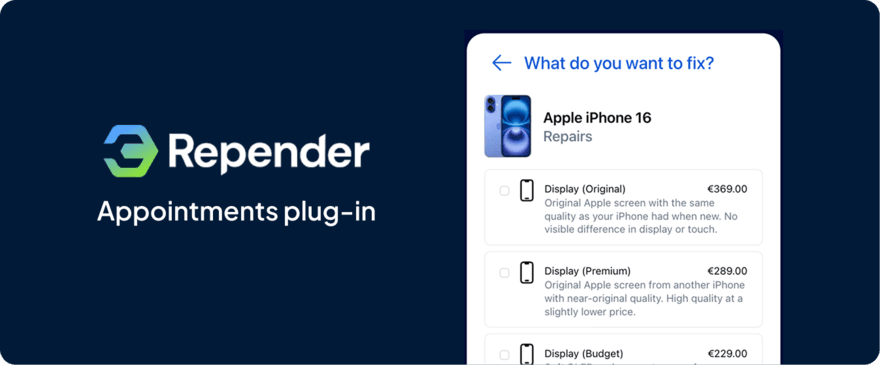
This makes booking a repair appointment easier for your customer and more organized for you.
Frequently asked questions
1. Should I avoid technical terms completely?
No, but only use them as extra information and always explain them in plain language.
2. Is “refurbished” clear to customers?
In most cases, yes—especially if you briefly explain that it’s an original screen with new glass.
3. Why is this so important for screens?
The screen is the most visible part of a repair and strongly influences how customers experience the final result.
Want to make sure screen qualities are clearly explained on your website?
We’d be happy to show you in a short demo how Repender supports this, or review your current settings together. That way you help customers choose with confidence and prevent misunderstandings afterwards.

Repender B.V.
Hercules 6, 5126RK Gilze
KVK: 94818932
Btw: NL866902648B01